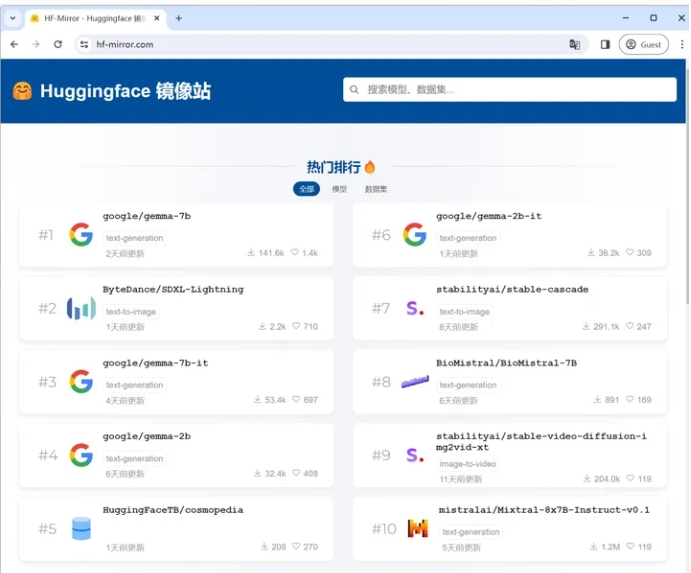
本系列文章介绍Huggingface Transformers的用法。Huggingface是一家在NLP社区做出杰出贡献的纽约创业公司,其所提供的大量预训练模型和代码等资源被广泛的应用于学术研究当中。
Transformers提供了数以千计针对于各种任务的预训练模型模型,开发者可以根据自身的需要,选择模型进行训练或微调,也可阅读api文档和源码, 快速开发新模型。
本文基于 Huggingface 推出的NLP 课程,内容涵盖如何全面系统地使用 HuggingFace 的各类库(即 Transformers、Datasets、Tokenizers 和 Accelerate),以及 Hugging Face Hub 中的各种模型。
本篇是该系列第上篇,如果觉得有帮助到你,可以点个赞鼓励下,让我继续更新~
课程主页 :https://huggingface.co/course/c
1)安装一个非常轻量级的 Transformers
!pip install transformers然后
import transformers2)建议安装开发版本,几乎带有所有用例需要的依赖项
!pip install transformers[sentencepiece]Transformers 库中最基本的对象是pipeline()函数。它将模型与其必要的预处理和后处理步骤连接起来,使我们能够直接输入任何文本并获得答案:当第一次运行的时候,它会下载预训练模型和分词器(tokenizer)并且缓存下来。
from transformers import pipelineclassifier = pipeline("sentiment-analysis") # 情感分析classifier("I've been waiting for a HuggingFace course my whole life.")# 输出# [{'label': 'POSITIVE', 'score': 0.9598047137260437}]也可以传几句话:
classifier(
["I've been waiting for a HuggingFace course my whole life.", "I hate this so much!"])# 输出'''[{'label': 'POSITIVE', 'score': 0.9598047137260437}, {'label': 'NEGATIVE', 'score': 0.9994558095932007}]'''目前可用的一些pipeline 有:
feature-extraction特征提取:把一段文字用一个向量来表示fill-mask填词:把一段文字的某些部分mask住,然后让模型填空ner命名实体识别:识别文字中出现的人名地名的命名实体question-answering问答:给定一段文本以及针对它的一个问题,从文本中抽取答案sentiment-analysis情感分析:一段文本是正面还是负面的情感倾向summarization摘要:根据一段长文本中生成简短的摘要text-generation文本生成:给定一段文本,让模型补充后面的内容translation翻译:把一种语言的文字翻译成另一种语言zero-shot-classification
这些pipeline的具体例子可见:Transformer models - Hugging Face Course
| Model | Examples | Tasks |
|---|---|---|
| Encoder 编码器模型 | ALBERT, BERT, DistilBERT, ELECTRA, RoBERTa | Sentence classification, named entity recognition, extractive question answering 适合需要理解完整句子的任务,例如句子分类、命名实体识别(以及更一般的单词分类)和提取式问答 |
| Decoder 解码器模型 | CTRL, GPT, GPT-2, Transformer XL | Text generation 解码器模型的预训练通常围绕预测句子中的下一个单词。这些模型最适合涉及文本生成的任务 |
| Encoder-decoder 序列到序列模型 | BART, T5, Marian, mBART | Summarization, translation, generative question answering 序列到序列模型最适合围绕根据给定输入生成新句子的任务,例如摘要、翻译或生成式问答。 |
本节测试:Transformer models - Hugging Face Course
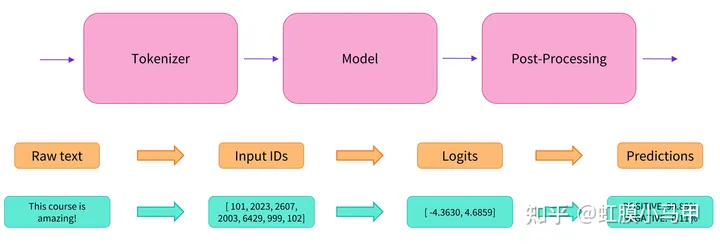
在接收文本后,通常有三步:Tokenizer、Model、Post-Processing。
1)Tokenizer
与其他神经网络一样,Transformer 模型不能直接处理原始文本,故使用分词器进行预处理。使用AutoTokenizer类及其from_pretrained()方法。
from transformers import AutoTokenizercheckpoint = "distilbert-base-uncased-finetuned-sst-2-english"tokenizer = AutoTokenizer.from_pretrained(checkpoint)若要指定我们想要返回的张量类型(PyTorch、TensorFlow 或普通 NumPy),我们使用return_tensors参数
raw_inputs = [
    "I've been waiting for a HuggingFace course my whole life.",
    "I hate this so much!",]inputs = tokenizer(raw_inputs, padding=True, truncation=True, return_tensors="pt")print(inputs)
PyTorch 张量的结果:
输出本身是一个包含两个键的字典,input_ids和attention_mask。
{
    'input_ids': tensor([
        [  101,  1045,  1005,  2310,  2042,  3403,  2005,  1037, 17662, 12172, 2607,  2026,  2878,  2166,  1012,   102],
        [  101,  1045,  5223,  2023,  2061,  2172,   999,   102,     0,     0,     0,     0,     0,     0,     0,     0]
    ]),
    'attention_mask': tensor([
        [1, 1, 1, 1, 1, 1, 1, 1, 1, 1, 1, 1, 1, 1, 1, 1],
        [1, 1, 1, 1, 1, 1, 1, 0, 0, 0, 0, 0, 0, 0, 0, 0]
    ])}
2)Model
Transformers 提供了一个AutoModel类,它也有一个from_pretrained()方法:
from transformers import AutoModelcheckpoint = "distilbert-base-uncased-finetuned-sst-2-english"model = AutoModel.from_pretrained(checkpoint)如果我们将预处理过的输入提供给我们的模型,我们可以看到:
outputs = model(**inputs)print(outputs.last_hidden_state.shape)# 输出 # torch.Size([2, 16, 768])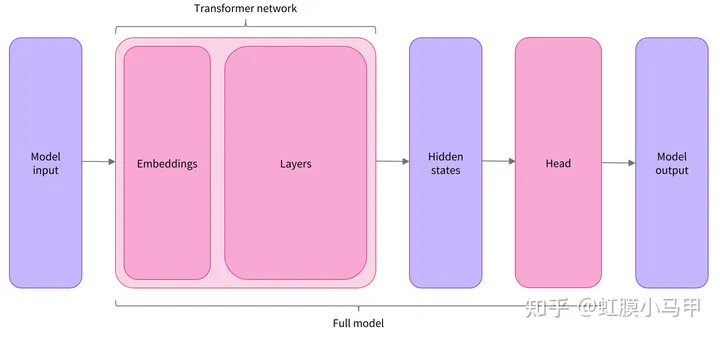
Transformers 中有许多不同的架构可用,每一种架构都围绕着处理特定任务而设计,清单:
*Model(retrieve the hidden states)*ForCausalLM*ForMaskedLM*ForMultipleChoice*ForQuestionAnswering*ForSequenceClassification*ForTokenClassification
and others
3)Post-Processing
模型最后一层输出的原始非标准化分数。要转换为概率,它们需要经过一个SoftMax层(所有 Transformers 模型都输出 logits,因为用于训练的损耗函数一般会将最后的激活函数(如SoftMax)与实际损耗函数(如交叉熵)融合 。
import torchpredictions = torch.nn.functional.softmax(outputs.logits, dim=-1)print(predictions)1)创建Transformer
from transformers import BertConfig, BertModel# Building the configconfig = BertConfig()# Building the model from the configmodel = BertModel(config)2)不同的加载方式
from transformers import BertModelmodel = BertModel.from_pretrained("bert-base-cased")3)保存模型
model.save_pretrained("directory_on_my_computer")4)使用Transformer model
sequences = ["Hello!", "Cool.", "Nice!"]encoded_sequences = [
    [101, 7592, 999, 102],
    [101, 4658, 1012, 102],
[101, 3835, 999, 102],]import torchmodel_inputs = torch.tensor(encoded_sequences)1)Loading and saving
from transformers import BertTokenizertokenizer = BertTokenizer.from_pretrained("bert-base-cased")tokenizer("Using a Transformer network is simple")# 输出'''{'input_ids': [101, 7993, 170, 11303, 1200, 2443, 1110, 3014, 102], 'token_type_ids': [0, 0, 0, 0, 0, 0, 0, 0, 0], 'attention_mask': [1, 1, 1, 1, 1, 1, 1, 1, 1]}'''# 保存tokenizer.save_pretrained("directory_on_my_computer")2)Tokenization
from transformers import AutoTokenizertokenizer = AutoTokenizer.from_pretrained("bert-base-cased")sequence = "Using a Transformer network is simple"tokens = tokenizer.tokenize(sequence)print(tokens) # 输出 : ['Using', 'a', 'transform', '##er', 'network', 'is', 'simple']# 从token 到输入 IDids = tokenizer.convert_tokens_to_ids(tokens)print(ids) # 输出:[7993, 170, 11303, 1200, 2443, 1110, 3014]3) Decoding
decoded_string = tokenizer.decode([7993, 170, 11303, 1200, 2443, 1110, 3014])print(decoded_string) # 输出:'Using a Transformer network is simple'1) 模型需要一批输入 Models expect a batch of inputs
将数字列表转换为张量并将其发送到模型:
import torchfrom transformers import AutoTokenizer, AutoModelForSequenceClassificationcheckpoint = "distilbert-base-uncased-finetuned-sst-2-english"tokenizer = AutoTokenizer.from_pretrained(checkpoint)model = AutoModelForSequenceClassification.from_pretrained(checkpoint)sequence = "I've been waiting for a HuggingFace course my whole life."tokens = tokenizer.tokenize(sequence)ids = tokenizer.convert_tokens_to_ids(tokens)input_ids = torch.tensor([ids])print("Input IDs:", input_ids)output = model(input_ids)print("Logits:", output.logits)# 输出'''Input IDs: [[ 1045, 1005, 2310, 2042, 3403, 2005, 1037, 17662, 12172, 2607, 2026, 2878, 2166, 1012]]Logits: [[-2.7276, 2.8789]]'''2) 填充输入 Padding the inputs
model = AutoModelForSequenceClassification.from_pretrained(checkpoint)sequence1_ids = [[200, 200, 200]]sequence2_ids = [[200, 200]]batched_ids = [
    [200, 200, 200],
[200, 200, tokenizer.pad_token_id],]print(model(torch.tensor(sequence1_ids)).logits)print(model(torch.tensor(sequence2_ids)).logits)print(model(torch.tensor(batched_ids)).logits)# 输出'''tensor([[ 1.5694, -1.3895]], grad_fn=<AddmmBackward>)tensor([[ 0.5803, -0.4125]], grad_fn=<AddmmBackward>)tensor([[ 1.5694, -1.3895], [ 1.3373, -1.2163]], grad_fn=<AddmmBackward>)'''我们已经探索了分词器的工作原理,并研究了分词 tokenizers、转换为输入 ID conversion to input IDs、填充 padding、截断 truncation和注意力掩码 attention masks。Transformers API 可以通过高级函数为我们处理所有这些。
from transformers import AutoTokenizercheckpoint = "distilbert-base-uncased-finetuned-sst-2-english"tokenizer = AutoTokenizer.from_pretrained(checkpoint)sequence = "I've been waiting for a HuggingFace course my whole life."model_inputs = tokenizer(sequence)# 可以标记单个序列sequence = "I've been waiting for a HuggingFace course my whole life."model_inputs = tokenizer(sequence)# 还可以一次处理多个序列sequences = ["I've been waiting for a HuggingFace course my whole life.", "So have I!"]model_inputs = tokenizer(sequences)# 可以根据几个目标进行填充# Will pad the sequences up to the maximum sequence lengthmodel_inputs = tokenizer(sequences, padding="longest")# Will pad the sequences up to the model max length# (512 for BERT or DistilBERT)model_inputs = tokenizer(sequences, padding="max_length")# Will pad the sequences up to the specified max lengthmodel_inputs = tokenizer(sequences, padding="max_length", max_length=8)# 还可以截断序列sequences = ["I've been waiting for a HuggingFace course my whole life.", "So have I!"]# Will truncate the sequences that are longer than the model max length# (512 for BERT or DistilBERT)model_inputs = tokenizer(sequences, truncation=True)# Will truncate the sequences that are longer than the specified max lengthmodel_inputs = tokenizer(sequences, max_length=8, truncation=True)# 可以处理到特定框架张量的转换,然后可以将其直接发送到模型。sequences = ["I've been waiting for a HuggingFace course my whole life.", "So have I!"]# Returns PyTorch tensorsmodel_inputs = tokenizer(sequences, padding=True, return_tensors="pt")# Returns TensorFlow tensorsmodel_inputs = tokenizer(sequences, padding=True, return_tensors="tf")# Returns NumPy arraysmodel_inputs = tokenizer(sequences, padding=True, return_tensors="np")Special tokens
分词器在开头添加特殊词[CLS],在结尾添加特殊词[SEP]。
sequence = "I've been waiting for a HuggingFace course my whole life."model_inputs = tokenizer(sequence)print(model_inputs["input_ids"])tokens = tokenizer.tokenize(sequence)ids = tokenizer.convert_tokens_to_ids(tokens)print(ids)# 输出'''[101, 1045, 1005, 2310, 2042, 3403, 2005, 1037, 17662, 12172, 2607, 2026, 2878, 2166, 1012, 102][1045, 1005, 2310, 2042, 3403, 2005, 1037, 17662, 12172, 2607, 2026, 2878, 2166, 1012]'''print(tokenizer.decode(model_inputs["input_ids"]))print(tokenizer.decode(ids))# 输出'''"[CLS] i've been waiting for a huggingface course my whole life. [SEP]""i've been waiting for a huggingface course my whole life."'''# 总结:从分词器到模型import torchfrom transformers import AutoTokenizer, AutoModelForSequenceClassificationcheckpoint = "distilbert-base-uncased-finetuned-sst-2-english"tokenizer = AutoTokenizer.from_pretrained(checkpoint)model = AutoModelForSequenceClassification.from_pretrained(checkpoint)sequences = ["I've been waiting for a HuggingFace course my whole life.", "So have I!"]tokens = tokenizer(sequences, padding=True, truncation=True, return_tensors="pt")output = model(**tokens)